Measure Areas, Distances, or Locations
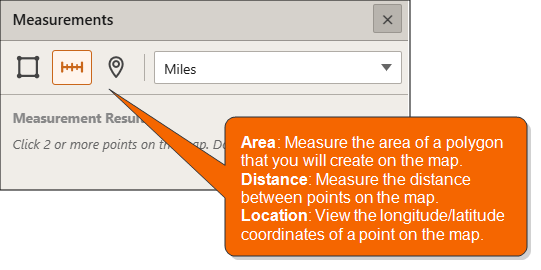
On the Interactive Map main toolbar, click the Show Measure icon ( ). When the Measurements pop-up window appears, specify what you want to measure and your preferred measurement unit, and then click on the map the extent or points to measure. Measurement results appear in the pop-up window.
Close the Measurements pop-up window by clicking the  located in the upper-right corner.
To Learn More:
 View Detailed Steps
- On the Interactive Map main toolbar, click the Show Measure icon (). The Measurements pop-up window appears.
- Click a measurement option and unit. The options are:
- Area: Allows you to measure the extent of a polygon on the map. If you select this option, the available area measurement units are:
- Acres: A measure with a unit area that equals to 4,840 square yards or 0.405 hectare.
- Sq Miles: A measure with a unit that is equal to an area of a square with a side length of one statute mile.
- Sq Kilometers: A measure with a unit that is equal to an area of a square with a side length of one kilometer.
- Hectares: A measure with a square unit that is equal to 100 ares (2.471 acres or 10,000 square meters).
- Sq Yards: A measure with a square unit that is equal to 9 square feet.
- Sq Feet: A measure with an area that is calculated by multiplying the length and width of the area in feet and one foot is equivalent to 1200/3937 meters (i.e., the international or standard foot).
- Sq Feet (US): A measure with the area of a square that is calculated by multiplying the length and width in feet and one foot is equivalent to .3048 meters (i.e., the U.S. survey foot).
- Sq Meters: A measure with an area unit that is equal to one meter length by one meter width.
- Distance: Allows you to measure the distance between points on the map. If you select this option, the available distance measurement units are:
- Miles: A unit of length equal to 5,280 feet, 1,760 yards, or 1,609.344 meters.
- Kilometers: A metric unit of measurement equal to 1,000 meters (approximately 0.62 miles).
- Feet: A measure using the international or standard foot equivalent; i.e., 1200/3937 meters.
- Feet (US): A measure using the U.S. survey foot equivalent; i.e., .3028 meters.
- Meters: A metric unit of length equal to 100 centimeters or approximately 39.37 inches.
- Yards: A unit of length equal to 3 feet or 36 inches.
- Nautical Miles: A unit used in measuring distances at sea, equal to approximately 2,025 yards (1,852 m).
- Location: Gives you the latitude and longitude coordinates of a point on the map. If you select this option, the available coordinate formats are:
- Degrees (Decimal): Coordinates in degrees decimal minutes format
- Degrees (DMS): Coordinates in degrees, minutes, and seconds format
- If you are measuring an area or a distance, on the map, click the location or point where you want to begin your measurement, click the points that you want to include in your measurement, and then double-click your ending point. Double-clicking the point indicates that the point is your measurement ending point.
If you are getting the coordinates of a location or point, simply place the cursor on the point or location that you want to check on the map.
Measurement results appear below the measurement unit box.
- To close the pop-up window, click the located on the upper-right corner of the box.