Switch Map Style
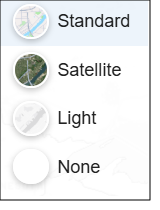
On the Interactive Map main toolbar, click the Switch Map Style icon ( ), and click the map type that you want to use and display as the basemap. The options are:
- Standard: Displays the 2D street map
- Satellite: Displays the satellite/aerial image of the map.
- Light: Displays a full set of cartographic features without distracting from added content.
- None: Displays a black and white map with only borders and no labels.