Profile Ranking Index Report: Specify Profile(s), a Sort Method, and a Report Output Type
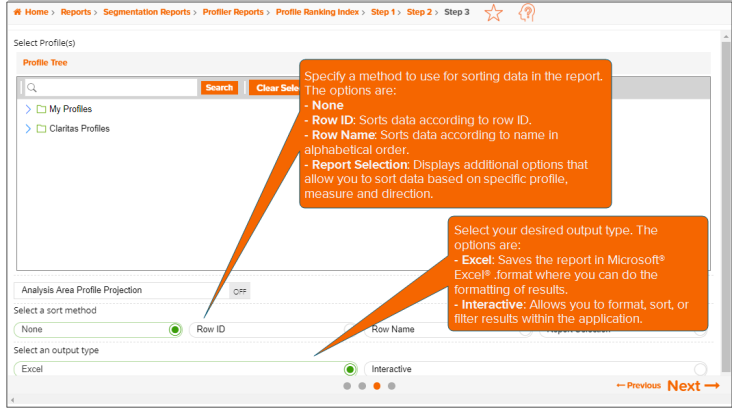
On the screen similar to the one shown below, specify the profiles that you want to use in your report, your preferred sort method, and a report output type.
Additional considerations:
- Use the Search function to locate your desired profiles.
- Use the Save Selection button to save your selected list profiles for future use.
- Use the Load Selection button to load a previously saved list of profiles.
- You can include data on counts of each profile within an analysis area.
NOTE: The Step number assignment that displays on top of the screen and the available options may differ depending on your selections on the previous screen, your device, and/or your screen resolution.
To Learn More:
 View Detailed Steps
NOTE: Depending on your screen resolution or device, some of the options mentioned below may not appear on this screen and you may need to go to the previous or next screen to complete the process. Simply follow the instructions below to set those parameters or refer to the Help provided for the previous screen.
- On the Step 3 screen, navigate to and select the profiles that you want to use to generate your report. You can also use the Search function to look for your desired profiles.
-
(Optional) To include data counts of each profile within an analysis area, perform the following steps:
- Click the OFF button next to Analysis Area Profile Projection to set it to ON. By default, this feature is OFF. Additional options for specifying an analysis area and projection data set appear below.
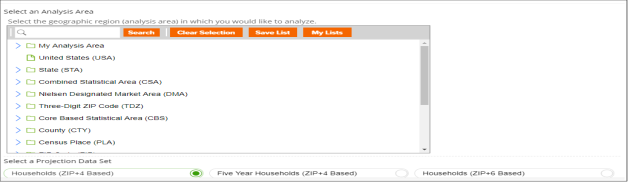
- Below Select a Projection Data Set, select the data set that you want to project your profile(s) against. The options are Households (ZIP+4 Based), Five Year Households (ZIP+4 Based) and Households (ZIP+6 Based).
NOTE: If you license ZIP+6 level distributions, it is generally recommended to select Households (ZIP+6 Based), as this level provides a greater level of granularity for the segment distributions than the ZIP+4 level.
- In the Select an Analysis Area box, navigate to and select your desired geography or area. You can use the Search function to locate your desired geography or area.
- Specify a sort method. The options are:
- None
- Row ID: Sorts data according to row ID
- Row Name: Sorts data according to name in alphabetical order
- Report Selection: Displays additional options that allows you to sort based on a specific profile, measure, and direction
- (Optional) If you selected Report Selection as your sort method, you need to specify the following options:
- Select a sort Profile: The list of available sort profiles is based on profiles selected in the previous Select a Comparison Profile(s) prompt.
- Select a sort Measure: The options are Count, Users/100 HHs, Index and ROC.
- Specify your preferred sort direction. The options are Ascending and Descending.
- (Optional) If you selected Report Selection as your sort method, you need to specify a subtotal method for sorting the data in your report. The subtotal method options are:
-
None: No method is applied.
-
Tops & Bottoms: This method allows you to view only the top and bottom entries. You can use this option to compare data quickly on reports with a large number of rows. If you select this method, you need to specify a number in the Select a number of rows for tops/bottoms drop-down list.
-
Tops: This method allows you to view only the top entries. If you select this method, you need to specify a number in the Select a number of rows for tops/bottoms drop-down list.
-
Bottom: This method allows you to view only the bottom entries. If you select this method, you need to specify a number in the Select a number of rows for tops/bottoms drop-down list.
- Select your desired output type. The options are:
- Excel: Saves the report in Microsoft® Excel® format where you can do the formatting of results
- Interactive: Allows you to format, sort or filter results within the application
- Click Next to proceed.
What's Next:
Profile Ranking Index Report: Specify a Report Output Delivery Method and a Report Name